
Play. Change. Play again.
Open an HTML5 source folder, edit supported text files and restart an isolated local preview.
An AI game editor companion for your desktop. Play and edit your HTML5 projects, explore installed games, and bring your next idea into SiGameGen’s visual workflow.
Open an HTML5 source folder, edit supported text files and restart an isolated local preview.
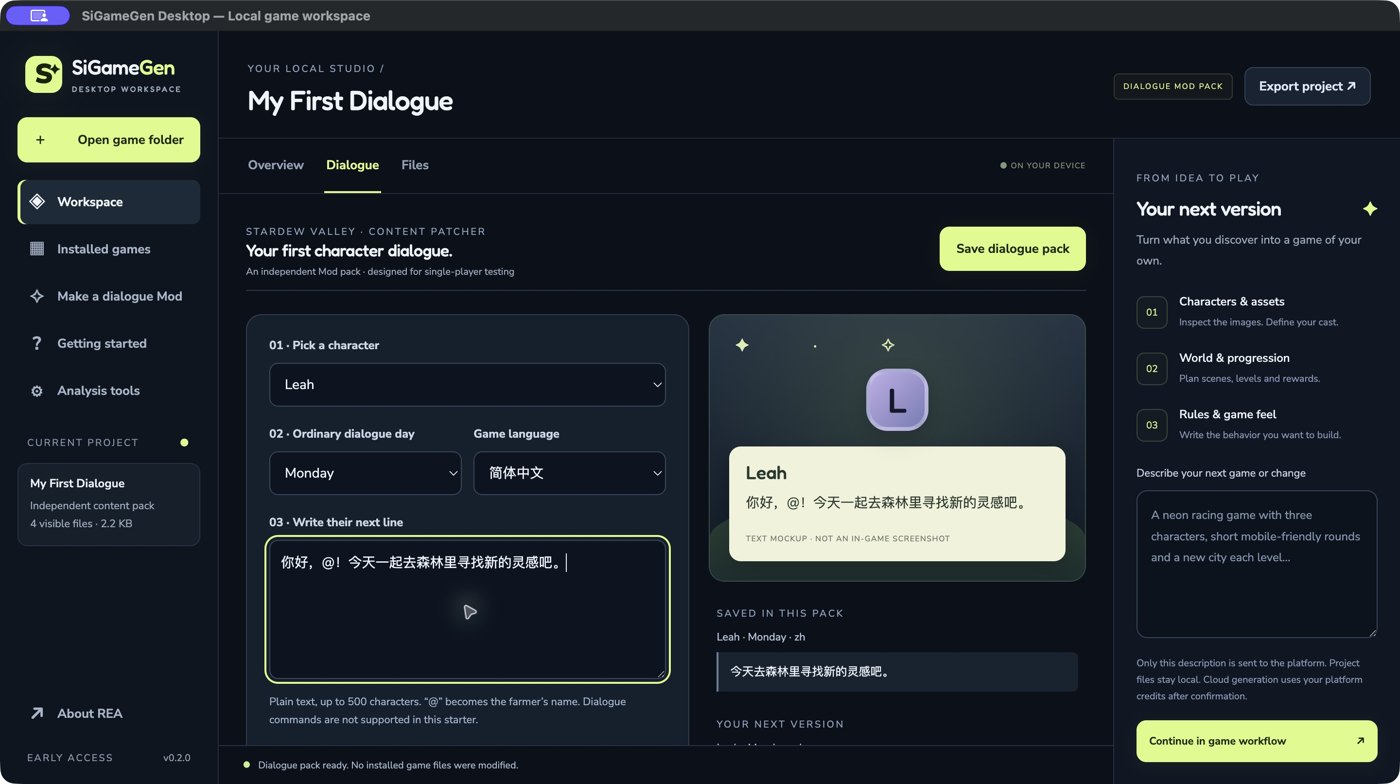
Choose a Stardew Valley character and write a new line. Preview, save and export an independent Content Patcher pack.
Discover Steam installations or select a folder. Inspect formats and analyze supported code components with REA.
H5 edits go into a working copy. Installed native-game analysis is read-only; no game executable is launched.
The desktop app opens with a three-step guide. Replay it anytime from Getting started. Try the included game without setup, explore an installed game, or build a dialogue pack without needing a game installed yet.
Create a new game in the web workflow →Open Neon Drift, play a round, change game.js, then export your version. Edits use a working copy with a backup of the previous file.
Scan your library, review Mod compatibility and inspect a code component. Files remain read-only; no installed game is launched.
Choose a character, day and English or Chinese text. Review the saved and proposed lines, save, then export. To test it in-game, you need your own Stardew Valley 1.6 installation, SMAPI and Content Patcher 2.9.0+.
Bring a description into the platform workflow. Define characters, world and rules before you confirm a build. This preview hands off your design notes; project upload and account synchronization are not included yet.
Choose an H5 project, an installed-game folder or the included playable example.
See loose assets, supported source files and static analysis evidence.
Edit H5 files locally, export a working copy, or develop a new idea in the web workflow.
These are early-access ZIP builds. They are not yet signed or notarized for a general release.
147 MB · v0.2.0
Verified on the local development Mac.
23df86ba4f276465c03ca78536e4eb8a4fdeb1edf901453640e514e0870cadca151 MB · v0.2.0
Packaged preview; native OS testing is pending.
d9b4ddbe94aa6c96d1c9897602f9b14aac6676f24ee40ba1266832d50772076f173 MB · v0.2.0
Packaged preview; native OS testing is pending.
f354b73a1c0707aad06795173e8dd6b7ed4796132c468c71babb5d868e33a204Extract the ZIP and open SiGameGen. For macOS, move the app to Applications. Since this preview has no Developer ID notarization, macOS may block it; follow Apple’s guidance for apps outside the App Store and verify the checksum before deciding to open it.
JavaScript and supported .NET metadata analysis use the bundled REA runtime. Deep native analysis requires your own Ghidra 12.1.x installation and a 64-bit JDK 21+. Windows native analysis is experimental. The preview does not recover arbitrary Unity/Unreal editor projects or convert binaries into editable Phaser games.
The preview edits HTML5 source projects and its own guided Stardew Valley dialogue packs. Native installed games can be inventoried and analyzed using compatible tools. Original binaries are read-only. Other games, models, scenes and broader Mod editing need separate adapters.
Export to a separate folder, close the game and back up your save separately. Install compatible SMAPI and Content Patcher, then copy the exported pack into Mods. Use a single-player test save. To remove it, close the game and remove that pack’s folder. The app does not install Mods, launch Steam games or edit saves. Seasonal, heart, event and other Mod dialogue can override an ordinary day-of-week line. File generation and export are verified; actual in-game testing is pending.
Stardew Valley Mod installation guide ↗No. Multiplayer rules and anti-cheat behavior depend on the game. Missing anti-cheat filename clues do not establish safety. Start with single-player games that support Modding and follow their rules. This preview cannot certify ban safety; its dialogue starter also does not detect or prevent multiplayer use.
Steam anti-cheat and game-ban documentation ↗No. Folder inspection and editing stay on your computer. The “Continue in game workflow” action opens the platform with the description you wrote. It does not upload project files.
Yes. Add images, audio and fonts to an H5 working copy. Supported source files are limited to 1 MB, individual imported assets to 10 MB, and complete copy/export projects to 50 MB. Packed game archives are not automatically extracted. The dialogue starter edits text only.
REA provides static analysis evidence: JavaScript module relationships, admitted .NET metadata, and native structure or code analysis where the host tools support it. Conclusions about gameplay and characters still need separate verification.
Explore the MIT-licensed REA project ↗