
Keep the playable build and the descriptive game page separate. Publish a real screenshot, clear controls and one obvious play link; test the exported files independently.
Start with a version you can finish
Save the exact build you are releasing. Play a complete round, check the win and loss screens, and restart. If the game has multiple courses or levels, test the transitions and the ending, not only the first area.
Check assets and permissions. Keep a record of where artwork, sound, fonts and libraries came from. An AI-generated image does not automatically give you permission to use another game’s characters, trademarks or copied interface.
Write a small release note that states what works and what remains untested. For a phone game, a desktop screenshot at a narrow width is useful evidence of layout, but it does not prove real-device input and audio behavior.
Use a game page for discovery and a player for play
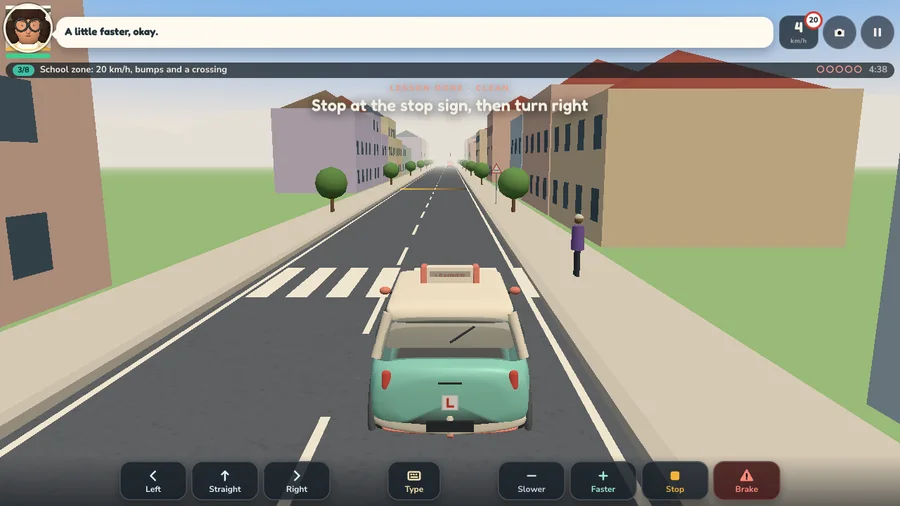
A useful game page includes the title, an actual screenshot, the goal, controls, supported input and a short description of the mechanics. Put an obvious play button near this information. Players arriving from a search result should not need to understand your editor first.
On SiGameGen, showcase pages such as Backseat Buddy provide this context. Their full-screen play links prioritize the game. Public showcase detail pages are indexable; player and private workspace pages are noindex. User-created share pages are not automatically added to the public showcase sitemap.
Keep advertisements outside the controls and show only configured inventory. An ad-preview placeholder is not an active ad campaign, a viewable impression or revenue. A share link can also work when no ad placement is available.
Download the playable build, not just the wrapper
For generated HTML games, the studio’s download control provides the game file. Open it independently and check whether artwork and sound still load. A page containing only the platform’s iframe is not an offline game export.
A multi-file project needs its entry page and required assets. Use relative asset paths and preserve filename case. Keep source projects, build dependencies and the playable output separate so a player does not need development tools just to run the game.
The Backseat Buddy release includes a playable ZIP and a separate source ZIP. That is an example of a specific prepared release, not a claim that every generated game currently includes a complete source project or desktop installer.
Check the destination’s packaging rules
If you choose itch.io, its official instructions support a self-contained HTML file or a ZIP with an index.html entry and the required assets. Follow the destination’s current size and embedding rules, then preview the actual uploaded build.
For your own hosting, upload the playable output to an HTTPS site and inspect asset requests. A file that works on a case-insensitive local filesystem can still fail after upload if an image path uses the wrong capitalization.
A desktop package is a separate distribution step. HTML5 export alone does not create a Steam release, store listing, signed installer or validated Windows build. Test each target format before offering it as supported.
Give the release an honest introduction
Use a distinctive game name and describe the activity players can try. A title such as “Backseat Buddy — a browser driving lesson game” is more informative than a string of unrelated popular-game names. Write for the player who wants to know whether the next click is worth their time.
Record a short clip from the actual build and link to the public game page. State your role as the creator when posting about it. Share a design lesson or a concrete improvement rather than publishing the same sales paragraph into unrelated communities.
Link the release to a relevant game playbook or creation tutorial if someone wants to make their own. Those links create a useful path from playing to learning without interrupting the round.
Common questions
Does an iframe stop players from downloading my game?
No. An iframe is the host page’s way of embedding a build. Export the underlying playable game and its required assets rather than exporting only the iframe wrapper.
Does SiGameGen index every shared game?
No. The current public showcase detail pages are indexable. Full-screen players, private workspaces and user-generated share pages are noindex and are not automatically public catalog entries.
Can I upload a generated HTML file to itch.io?
A self-contained file can use itch.io’s HTML upload flow; multi-file builds need the required ZIP structure. Test that particular exported build and follow the current platform rules.
Sources & product documentation
Official pages checked on October 12, 2026. Product features and policies can change.
- itch.io: uploading HTML5 games ↗Official HTML and ZIP entry-point requirements; check the current documentation when uploading.
Build a small game you can finish.
Start with a template and a clear brief. Opening the builder is free; AI builds and edits use credits.